What Is ExamBPPP?
ExamBPPP is the secure exam browser for the ABM 2026 student talent assessment in Indonesia. It is published by the Indonesian Ministry of Primary and Secondary Education, Kementerian Pendidikan Dasar dan Menengah RI, and it turns a student phone into a locked exam room: one login, one assessment, and nothing else on screen while the test runs.
ABM stands for Asesmen Bakat Murid, the student talent assessment. Students open the ExamBPPP app, sign in with the Participant ID and Password given by their school, and the app walks them through a set of device checks before the questions begin. The point is simple: every student sits the same assessment under the same conditions, on whatever phone they have.
The app is a new entry with more than 100 thousand downloads on Google Play, which tells you how many schools moved onto it at once for the current assessment round. It is free, it is built for both Android and iOS, and this site is its download home: install help, login notes, device check fixes and exam day checklists, all tested on real phones.
How ExamBPPP Works
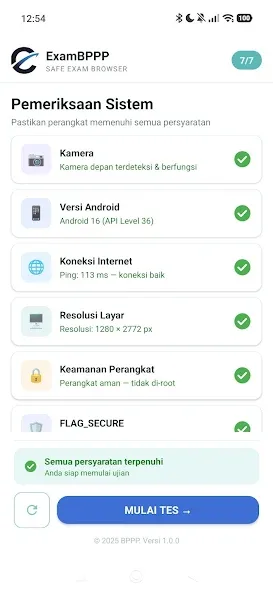
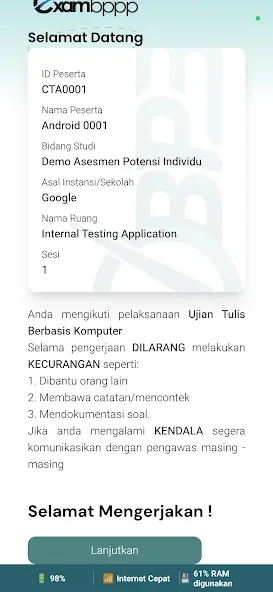
The flow has four plain steps. First, install the ExamBPPP app on your phone and open it. Second, log in with your Participant ID and Password. Third, let the app run its device checks: camera, microphone, iOS or Android version, internet connection, screen resolution and device security. Fourth, the app locks the device into the secure exam environment and the assessment begins.
While the exam runs, the lock stays on. Switching to another app, opening a browser, or taking a screenshot is blocked, because the whole purpose of an exam browser is to keep the test honest. When you finish the last question and submit, the lock lifts and your phone is yours again. Nothing in the flow needs a computer, and nothing needs an account beyond the Participant ID your school gave you.
ExamBPPP Features
Participant ID login
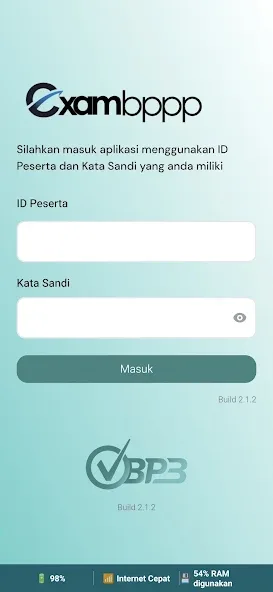
Sign in with the Participant ID and Password from your school. No separate account to create and no email signup in the way.
Device checks first
Camera, microphone, operating system version, internet, screen resolution and device security are all checked before the first question.
Locked exam screen
Once the assessment starts, the app locks the device into the exam environment so nothing else can open on top of it.
ABM 2026 assessment
Built for the Asesmen Bakat Murid, the student talent assessment run by the ministry as ABM 2026.
Android and iOS
The same login and the same checks on both platforms, so a student on an iPhone sits the same exam as a student on Android.
Clear question flow
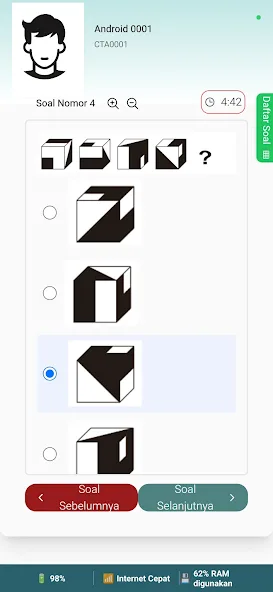
Questions arrive one screen at a time with a plain question layout, so the focus stays on the question in front of you.
Submit and confirm
Finished answers are sent in one clear submit step, with a confirmation so you know the assessment actually went through.
Free for students
There is no charge to install or sit the assessment. The app is free, and the login comes from your school.
How to Install ExamBPPP on Android
- Open the download page. Use the download button at the top of this page and wait out the short countdown on the next screen. The file link is added to that page as soon as it is ready, and once it is live there, tap the button so the file lands in your downloads folder.
- Tap the finished file. Android will ask whether your browser may install apps from outside the store. Allow it for this install and tap install.
- Open ExamBPPP from your app drawer. The icon is the green app mark. Tap it and the login screen appears.
- Keep your Participant ID ready. Your school gives you the Participant ID and Password. Have both on paper before you tap anything, so the login takes seconds.
- Let the device checks run. The app checks your camera, microphone, operating system version, internet, screen resolution and device security. Fix anything it flags now, not on exam day.
- Do a practice open. Open the app once the day before the exam, confirm the login works, then close it. Exam morning is the wrong time to discover a problem.
Device Checks Before the Exam
ExamBPPP checks six things before it lets you into the assessment: the camera, the microphone, the iOS or Android version on your phone, the internet connection, the screen resolution, and the security state of the device. Each check has a plain pass or fail, and a fail tells you what to fix.
Run the checks the day before the exam, not ten minutes before it. A camera permission you denied months ago, a phone on an old operating system, or a screen set to an odd zoom level can each block the start, and all three are quick fixes when you have time. Charge the phone fully, connect to steady Wi-Fi or mobile data, and close other apps so the checks measure your phone at its best.
The six checks
- Camera
- Microphone
- Operating system version
- Internet connection
- Screen resolution
- Device security
Logging In With Your Participant ID
Your Participant ID and Password come from your school, and they are the only login the app asks for. Type the ID exactly as printed, including any letters and numbers in the right order, then the password. If the app says the login failed, check the ID character by character before anything else: a single swapped letter is the most common cause.
Never share your Participant ID with another student, and never log in on a borrowed phone and leave the session open. If your password does not work at all, your school is the place that can reset it. The app itself has no password recovery screen, because the credentials belong to the school assessment system.
On Exam Day
Exam morning is a checklist, not a race. Charge the phone to full the night before, and bring the charger. Eat, sleep, and arrive with your Participant ID and Password written on paper as a backup. Open ExamBPPP, log in, let the device checks pass, and wait for the assessment to begin.
Once the questions start, answer at a steady pace and use the full time. If the internet drops for a moment, stay calm and stay in the app: the exam is built to survive short breaks in connection. If the app closes by accident, reopen it at once and log in again with the same credentials. Panic costs more marks than any single question.
Safety and Verification
Every ExamBPPP install described on this site is checked on real Android phones before it is published: the file installs cleanly, the icon and first launch behave, the login screen appears, and the device checks run as described. If a build misbehaves on our phones, it does not go up until we understand why.
Install only from the download page here or from the store listing for the ministry app, and check the developer name on the listing: Kementerian Pendidikan Dasar dan Menengah RI. A file from a random chat group or a lookalike page is not the same app, however similar the icon looks. The full testing routine is published on the how we review page.
Technical Details
Before a single question appears, ExamBPPP runs a readiness sweep on the phone: it tests the camera and microphone, confirms the internet connection holds, checks the screen resolution, and looks for anything that could break the secure session. A failed check is a gift, not a problem: it tells you the day before the exam instead of the morning of it, while there is still time to borrow another phone or fix the setting.
The app locks the device into a secure exam environment while the assessment runs, which is the core of what an exam browser does. There is no desktop edition to install and no account signup inside the app. The assessment itself, Asesmen Bakat Murid, measures student talent rather than memorised school subjects.
Pros and Cons
Pros
- One login, one assessment, no account signup
- Device checks catch problems before exam day
- Locked screen keeps the assessment fair for everyone
- Free for students, on Android and iOS
- Plain question flow that is easy to follow under pressure
Cons
- A failed device check can block the start if left to exam day
- No password recovery inside the app itself
- Needs steady internet for the whole session
- The lock means no switching apps during the test
Troubleshooting
Login fails most often on a mistyped Participant ID, so read it back letter by letter. If the app will not open, clear its cache, restart the phone, and reinstall once the file link is live on the download page. If a device check fails, work through the checks one at a time: camera permission in the phone settings, microphone permission, a stronger connection, and the screen zoom back to normal.
If the app closes during the exam, reopen it immediately and log in again with the same Participant ID and Password. If the internet drops, stay in the app and let it reconnect instead of force closing it. For anything the phone cannot fix, the school running the assessment is the right contact, because they hold the credentials and the exam schedule.
How to Update
When a new build of the ExamBPPP app is ready, install it the same way as the first install: fetch the file from the download page once the file link is live there, tap it, and let Android replace the older copy. Your Participant ID and Password do not change with an update, and neither does your assessment schedule.
Update at least a day before the exam, never on exam morning. After updating, open the app once, confirm the login screen appears, and run the device checks. That one minute of checking is what turns an update from a risk into a non event.